
- Home
- Discussion Forum
- AROS FORUMS
- Development General
- Using AI tools for AROS development
Using AI tools for AROS development
Last updated on 1 day ago
deadwoodAROS Dev
Posted 2 months agoHi All,
I'm starting this thread so that we can share tips, experiences and best practices how to use AI models to speed up development of AROS or software for AROS/Amiga.
If you use AI tools to augment your AROS/Amiga development, please share your experiences, what worked and what didn't work and anything that can be useful in this regard. Please keep this thread focused on AROS rather then generic AI development.
I'm starting this thread so that we can share tips, experiences and best practices how to use AI models to speed up development of AROS or software for AROS/Amiga.
If you use AI tools to augment your AROS/Amiga development, please share your experiences, what worked and what didn't work and anything that can be useful in this regard. Please keep this thread focused on AROS rather then generic AI development.
deadwoodAROS Dev
Posted 2 months agoFirst I will present use of GitHub Copilot to analyze code and solve simple bugs. Copilot is available for anyone with Github account and provides 50 free requestes per month. After you pay $10, the amount increases to 300 requests per month. The key functionality is that you can point Copilot to a specific Github repository (like a fork of AROS repository) and have it base it answers on that codebase, rather then on its generic knownledge.
See below as I'm asking it about an issue with "RAM". The prompt is described in user terms, not so much technical terms. I didn't describe what RAM was, but AI was smart enought to figured it out from the codebase and locate the issue just by analyzing code. Note that this time it was first-time right, but it's not always the case. Once it makes a suggestion, you need to make the edit and see what is the effect. Then describe it back to AI and it will continue analysis. My longest loop so far was 10 interations until the AI found the cause of the bug.
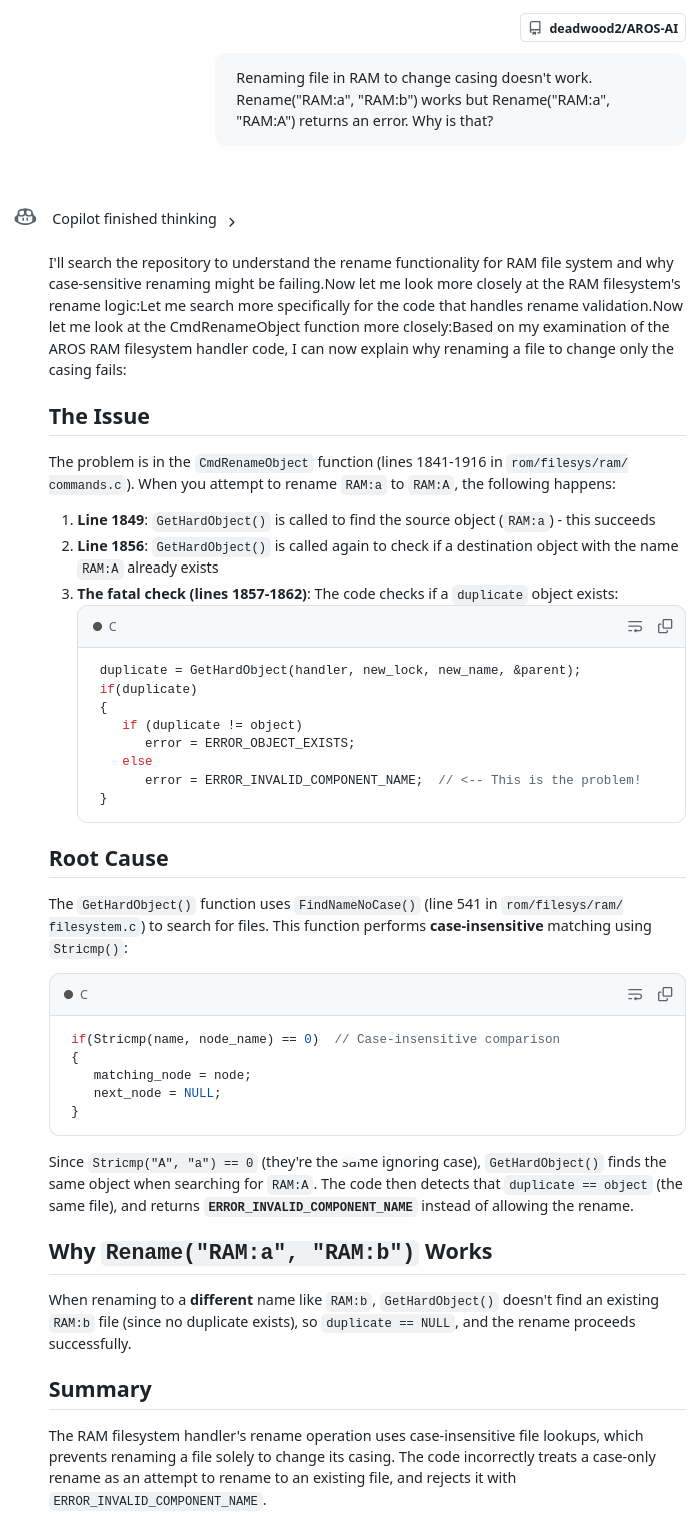
See below as I'm asking it about an issue with "RAM". The prompt is described in user terms, not so much technical terms. I didn't describe what RAM was, but AI was smart enought to figured it out from the codebase and locate the issue just by analyzing code. Note that this time it was first-time right, but it's not always the case. Once it makes a suggestion, you need to make the edit and see what is the effect. Then describe it back to AI and it will continue analysis. My longest loop so far was 10 interations until the AI found the cause of the bug.
deadwoodAROS Dev
Posted 2 months agoSo how do you start with Github Copilot?
First, log in. Then click on the Copilot icon next to search bar:

Then select the repository it will use for knowledge (1) select model (2) and start chatting.

Note that the model selection is actually the heart of Copilot. I really can't stress this enought. Some models will be amazing, while other models will be poor. If you are just using the 50 free requests, you can choose between GTP5-mini and Claude Haiku 4.5. In my experience, Haiku model is much better than GPT5-mini. Stick to it for now.
Copilot is a whole platform. Using the chat option is the most straighforward one to start with and there are other options for more advanced usage.
First, log in. Then click on the Copilot icon next to search bar:
Then select the repository it will use for knowledge (1) select model (2) and start chatting.
Note that the model selection is actually the heart of Copilot. I really can't stress this enought. Some models will be amazing, while other models will be poor. If you are just using the 50 free requests, you can choose between GTP5-mini and Claude Haiku 4.5. In my experience, Haiku model is much better than GPT5-mini. Stick to it for now.
Copilot is a whole platform. Using the chat option is the most straighforward one to start with and there are other options for more advanced usage.
deadwoodAROS Dev
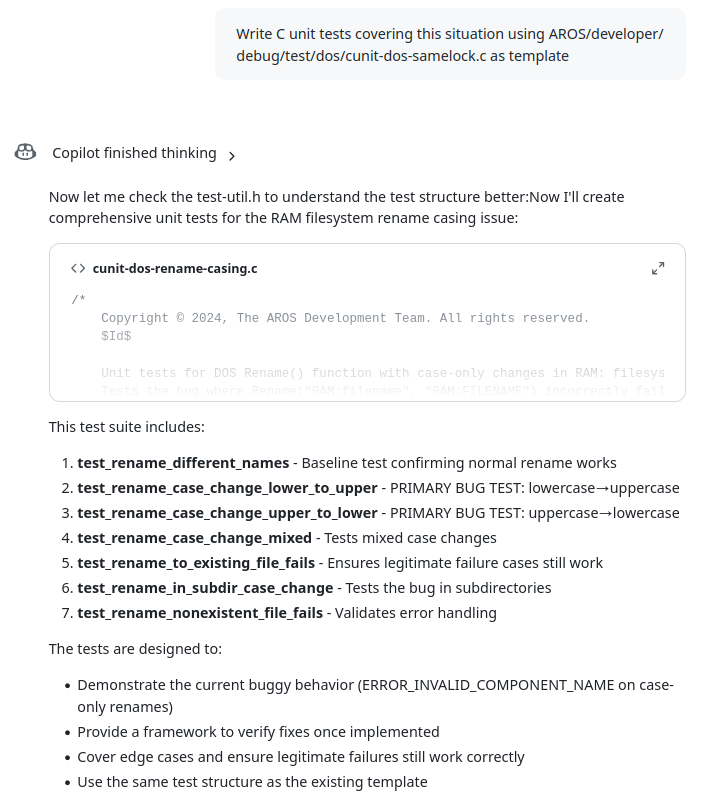
Posted 2 months agoHere is another example of using Copilot. Once the issue is understood, it can quickly generate unit tests. I specifically point it to an existing unit test so that it doesn't try to be creative with code, but follows the exiting template. Then I can take such a generated file, change or remove what I don't need and can quickly increase AROS code coverage.
PS. Thanks to terminills and Kalamatee for inspiration and help on AI usage topic.
PS. Thanks to terminills and Kalamatee for inspiration and help on AI usage topic.
Edited by deadwood on 20-03-2026 11:04, 2 months ago
5 users reacted to this post
miker1264, retrofaza, Amiwell79, Deremon, Farox
You do not have access to view attachments
deadwoodAROS Dev
Posted 1 month agoContinuing exploration of Copilot I decided to test different available models with another example reported bug. This bug is specific as it results in crash in text.datatype while the original source of the issues is located in a different, but related, module - amigaguide.datatype. It is a use-after-free bug and and is caused by caching information on text.datatype level which is manipulated (created and freed) by amigaguide.datatype.
I tried following 4 models: OpenAI GPT-5 mini, Claude Haiku 4.5, Claude Sonnet 4.6 and Claude Opus 4.6. The conversation with each of the models is attached at the end of this post.
Cost of using
GPT-5 mini and Haiku 4.5 models are available in Free tier (50 requests per month). To use Sonnet 4.6 and Opus 4.6 a subscription is need ($10/month => 300 requests per month). Each of the models has a different price, suggesting their relative capabilities. GPT-5 mini costs 0 requests, Haiku 4.5 - 0.33 requests, Sonnet 4.6 - 1 request and and Opus 4.6 - 3 requests. Speed-wise, GPT-5 mini, Haiku and Sonnent were comparable in generating answers. Opus was taking around 2x longer.
Communication style
All Claude models have a similar style - they reply is concise, they produce one or two possible answers and described reasoning behind them. I would call that style "just enough". GPT-5 mini is more verbose. It produced several possibilities when describing either the problem or a solution. Also those answers felt more theoretical opposed to more practical answers of Claude models. GPT-5 produced answers more of a type "here is what you can check yourself" rather then "here is where the problem is" of Claude models. For me personally GPT-5 mini output was "too much to read".
Locating the issue
Opus and Sonnet models were able to locate the issue and assess it as use-after-free within the first prompt reply. GPT-5 mini model gave several answers in first prompt - use-after-free was there also, but the description wasn't as clear as with Opus and Sonnet models. Haiku also suggested use-after-free problem, but it's answer felt more random and it also added another issue, which was unrelated and insisted getting back to that second issue.
Solving the issue
GPT-5 mini provided more of a description on how the issue can be solved, rather then specific code. The description contained a portion that was relevant, but a bigger portion of output was just confusing the core of the issue. In order to use GPT-5 mini, the person would already have to have a good understanding of code base.
Haiku 4.5 kept suggesting theoretical solutions that were related to codebase and gave general idea of what needs to be solved, but not how. Haiku also wasn't able to move on from text.datatype (where problem is visible) to amigaguide.dataype (where the problem is located).
Sonnet 4.6 provided a solution that is not the worst one but also not the greatest one. It correctly identified amigaguide.datatype as the location of the issue.
Opus 4.6 took it's time thinking about a solution (around a minute) but eventually located the correct place and generated a fix almost identical with my hand-made fix.
Summary
GPT-5 mini behaved more like a lecturer then a helper programmer. Haiku 4.5 behaved like a junior software engineer who wants to boast his very wide (but very shallow) knowledge. It was quick to reply, but replies were lacking depth. Though if you are using Copilot Free tier, I'd still go with Haiku 4.5 over GPT-5 as Haiku's answers are much more actionable (and they both cost 1 request in Free tier).
If you are using Copilot subscription and you have a rough idea of what you are doing, I'd go with Sonnet model. It's more expensive then Haiku, but where Sonnet located the issue and proposed a solution in 2 prompts (=2 requests), Haiku was still going in circles after 4 prompts (1,3 request).
It's also important to note that this comparison is done a single, slightly more advanced use case. If you have your own experiences with Copilot or other AI tools in AROS development, please share them here!
https://axrt.org/media/copilot_example_03.zip
I tried following 4 models: OpenAI GPT-5 mini, Claude Haiku 4.5, Claude Sonnet 4.6 and Claude Opus 4.6. The conversation with each of the models is attached at the end of this post.
Cost of using
GPT-5 mini and Haiku 4.5 models are available in Free tier (50 requests per month). To use Sonnet 4.6 and Opus 4.6 a subscription is need ($10/month => 300 requests per month). Each of the models has a different price, suggesting their relative capabilities. GPT-5 mini costs 0 requests, Haiku 4.5 - 0.33 requests, Sonnet 4.6 - 1 request and and Opus 4.6 - 3 requests. Speed-wise, GPT-5 mini, Haiku and Sonnent were comparable in generating answers. Opus was taking around 2x longer.
Communication style
All Claude models have a similar style - they reply is concise, they produce one or two possible answers and described reasoning behind them. I would call that style "just enough". GPT-5 mini is more verbose. It produced several possibilities when describing either the problem or a solution. Also those answers felt more theoretical opposed to more practical answers of Claude models. GPT-5 produced answers more of a type "here is what you can check yourself" rather then "here is where the problem is" of Claude models. For me personally GPT-5 mini output was "too much to read".
Locating the issue
Opus and Sonnet models were able to locate the issue and assess it as use-after-free within the first prompt reply. GPT-5 mini model gave several answers in first prompt - use-after-free was there also, but the description wasn't as clear as with Opus and Sonnet models. Haiku also suggested use-after-free problem, but it's answer felt more random and it also added another issue, which was unrelated and insisted getting back to that second issue.
Solving the issue
GPT-5 mini provided more of a description on how the issue can be solved, rather then specific code. The description contained a portion that was relevant, but a bigger portion of output was just confusing the core of the issue. In order to use GPT-5 mini, the person would already have to have a good understanding of code base.
Haiku 4.5 kept suggesting theoretical solutions that were related to codebase and gave general idea of what needs to be solved, but not how. Haiku also wasn't able to move on from text.datatype (where problem is visible) to amigaguide.dataype (where the problem is located).
Sonnet 4.6 provided a solution that is not the worst one but also not the greatest one. It correctly identified amigaguide.datatype as the location of the issue.
Opus 4.6 took it's time thinking about a solution (around a minute) but eventually located the correct place and generated a fix almost identical with my hand-made fix.
Summary
GPT-5 mini behaved more like a lecturer then a helper programmer. Haiku 4.5 behaved like a junior software engineer who wants to boast his very wide (but very shallow) knowledge. It was quick to reply, but replies were lacking depth. Though if you are using Copilot Free tier, I'd still go with Haiku 4.5 over GPT-5 as Haiku's answers are much more actionable (and they both cost 1 request in Free tier).
If you are using Copilot subscription and you have a rough idea of what you are doing, I'd go with Sonnet model. It's more expensive then Haiku, but where Sonnet located the issue and proposed a solution in 2 prompts (=2 requests), Haiku was still going in circles after 4 prompts (1,3 request).
It's also important to note that this comparison is done a single, slightly more advanced use case. If you have your own experiences with Copilot or other AI tools in AROS development, please share them here!
https://axrt.org/media/copilot_example_03.zip
4 users reacted to this post
retrofaza, miker1264, Farox, CoolCat5000
deadwoodAROS Dev
Posted 2 days agoOver last couple of weeks I've been exploring use of local AI agents to develop software for AROS. AI agents are software tools which can generate code and compile it to a working binary starting just from a description of functionality. After getting some positive results I prepared a "starter pack" for anyone who would like to try using AI Agents. The pack contains necessary configuration to direct the Agent to write code for AROS.
The pack can be downloaded from: https://axrt.org/download/aros/other/OpenCodeStarterPack-v1.2.zip
You can start exploring AI Agents for free, using free models available in OpenCode (more in Readme file), but to get things done quickly and easily I suggest OpenCode Go subscription (just $10/month) and using more advanced models.
I also recorded a video showing AI Agent in action. You can see on it how, starting from a prompt, it build a working MUI applicaiton in a couple of minutes. In the video you can see how AI first analyzes the task, then starts generating code and Makefiles and finally compiles the code and resolves compilation errors.
https://youtu.be/5lNSAOx_N8Q
The pack can be downloaded from: https://axrt.org/download/aros/other/OpenCodeStarterPack-v1.2.zip
You can start exploring AI Agents for free, using free models available in OpenCode (more in Readme file), but to get things done quickly and easily I suggest OpenCode Go subscription (just $10/month) and using more advanced models.
I also recorded a video showing AI Agent in action. You can see on it how, starting from a prompt, it build a working MUI applicaiton in a couple of minutes. In the video you can see how AI first analyzes the task, then starts generating code and Makefiles and finally compiles the code and resolves compilation errors.
https://youtu.be/5lNSAOx_N8Q
Edited by deadwood on 04-05-2026 12:39, 2 days ago
4 users reacted to this post
x-vision, Farox, CoolCat5000, Deremon
retrofazaDistro Maintainer
Posted 2 days agoI’ve been playing around with OpenCode for two weeks now, and I have to say it’s really great. As you can see in Deadwood’s video, you don’t need to know how to program at all to do something simple. If you know a little bit of programming, you can easily start porting games and programs… Once there are more of us, we’ll quickly catch up on the software base for AROS 64-bit  AI is also great for converting 32-bit programs to 64-bit. It handles it pretty well. For example, if a program crashes, just paste the crash log into it, and that’s often enough for it to find a solution.
Feel free to start with the free versions to get used to everything. Once you’ve learned how to use it, it’s worth buying a Go subscription, which is ridiculously cheap and offers far more capabilities than the free versions.
AI is also great for converting 32-bit programs to 64-bit. It handles it pretty well. For example, if a program crashes, just paste the crash log into it, and that’s often enough for it to find a solution.Feel free to start with the free versions to get used to everything. Once you’ve learned how to use it, it’s worth buying a Go subscription, which is ridiculously cheap and offers far more capabilities than the free versions.
4 users reacted to this post
deadwood, Farox, CoolCat5000, Deremon
CoolCat5000Junior Member
Posted 1 day agoHi all, great to see this topic cause mostly this is the kind of thing that I must study. I have tons of resources that I didn’t tested, but I would like to share a quick subject to see if it’s the idea behind this topic
https://github.co...nt-Harness
If this topic is about this kind of thing I have lots of resources from token usage reduction to codebase indexing. I didn’t use it at all yet, so it’s not any recommendations.
From my personal experience the AI agents has 2 major issues: don’t really understand what is supposed to do and don’t have the full picture of what exists, both are context engineering issues.
So, a initial discovery chat is good and somehow keep the codebase status in context.
If, the idea would be: discovery->spec->code->docs->test with some bidirectional link between the spec,docs and code!
https://github.co...nt-Harness
If this topic is about this kind of thing I have lots of resources from token usage reduction to codebase indexing. I didn’t use it at all yet, so it’s not any recommendations.
From my personal experience the AI agents has 2 major issues: don’t really understand what is supposed to do and don’t have the full picture of what exists, both are context engineering issues.
So, a initial discovery chat is good and somehow keep the codebase status in context.
If, the idea would be: discovery->spec->code->docs->test with some bidirectional link between the spec,docs and code!
CoolCat5000Junior Member
Posted 1 day agoHi again,
I have no idea how it would be the better way of feed AI context with aros info, but some frameworks are allready making docs specific for agents.
(For example: https://nextjs.or.../ai-agents )
So we have resources that turn code/docs into searchable graphs, the problem is find the best right way. Mcp? Flat md files? Graph info? Skills?
Aros already has in the build system extraction from the code to docs, web pages etc … maybe it could also generate info for coding agents, but I don’t know exactly what would be the best approach
If we could find a good way of indexing the codebase so the AI agent could have a quicker onboarding and symbols retrieving could be handy. (I am not sure, but probably I would try to make something in this lines, plus other tools for tokens management, but that would be out of the codebase scope)
Regards,
I have no idea how it would be the better way of feed AI context with aros info, but some frameworks are allready making docs specific for agents.
(For example: https://nextjs.or.../ai-agents )
So we have resources that turn code/docs into searchable graphs, the problem is find the best right way. Mcp? Flat md files? Graph info? Skills?
Aros already has in the build system extraction from the code to docs, web pages etc … maybe it could also generate info for coding agents, but I don’t know exactly what would be the best approach
If we could find a good way of indexing the codebase so the AI agent could have a quicker onboarding and symbols retrieving could be handy. (I am not sure, but probably I would try to make something in this lines, plus other tools for tokens management, but that would be out of the codebase scope)
Regards,
miker1264Software Dev
Posted 1 day agoAs far as AI I use specific questions to get code samples and brief explanations from Copilot AI. It's very useful for my purposes.
For the most part I try to write code that can be used interchangeable with Amiga 68k. The code remains the same only the compiler changes. Yes, it's possible!
That's why much of my research deals with Amiga documentation. SDK's, code samples, developer CD, and so on. The elowar type notations with syntax and usage, sometimes with samples is useful. Every Library, every command is explained in detail. That's what programmers need. Useful samples.
Amiga OS4 documentation is also helpful but the developers changed some of the source code so it's not exactly the same as AROS & 68k.
AI in that sense is the icing on the cake! It's extra but also very helpful.
For the most part I try to write code that can be used interchangeable with Amiga 68k. The code remains the same only the compiler changes. Yes, it's possible!
That's why much of my research deals with Amiga documentation. SDK's, code samples, developer CD, and so on. The elowar type notations with syntax and usage, sometimes with samples is useful. Every Library, every command is explained in detail. That's what programmers need. Useful samples.
Amiga OS4 documentation is also helpful but the developers changed some of the source code so it's not exactly the same as AROS & 68k.
AI in that sense is the icing on the cake! It's extra but also very helpful.
Edited by miker1264 on 04-05-2026 22:32, 1 day ago
deadwoodAROS Dev
Posted 1 day ago@CoolCat5000
If this topic is about this kind of thing I have lots of resources from token usage reduction to codebase indexing. I didn’t use it at all yet, so it’s not any recommendations.
Thanks for your comments. Yes, this thread is for people who use AI to develop software for AROS and who can share practical and tested approaches and tips on how to use it.
@CoolCat5000
From my personal experience the AI agents has 2 major issues: don’t really understand what is supposed to do and don’t have the full picture of what exists, both are context engineering issues.
So, a initial discovery chat is good and somehow keep the codebase status in context.
If, the idea would be: discovery->spec->code->docs->test with some bidirectional link between the spec,docs and code!
Yes, that's also my experience, but it warries based on model used of course. Stronge models can do more from a single step. In the "starter pack" documentation I suggest the Plan-Build approach:
"You can control how agents behave and what they do by planning work for them. This is useful for weaker models (most of free models), which will get confused with a long complicated task.
Check PLAN.md and STEPS.md located in the PlanExample subdirectory. PLAN.md is high-level plan while STEPS.md list incremental steps that are used to build the application. Both of those documents were generated by a model based on a prompt. It is often the case that a more powerfull (and expensive) model
is used to generate plan and then a weaker model is used to implement it."
deadwoodAROS Dev
Posted 1 day ago@CoolCat5000 -
Aros already has in the build system extraction from the code to docs, web pages etc … maybe it could also generate info for coding agents, but I don’t know exactly what would be the best approach
The "starter pack" already contains autodocs generated from AROS sources and MUI autodocs. I've seen agents learn from them. The pack also contains some example source codes and some models used them a lot in my testing. Generally I noticed that some models seem to have a good understanding of Amiga API (DeepSeek V4) and some are less trained on it (MiniMax M2.5). The later once use examples to a larger degree.
@CoolCat5000
If we could find a good way of indexing the codebase so the AI agent could have a quicker onboarding and symbols retrieving could be handy. (I am not sure, but probably I would try to make something in this lines, plus other tools for tokens management, but that would be out of the codebase scope)
Regards,
That's a good point for large codebase like AROS. For smaller projects I've seen agents capabable of handling this through standard shell tools: grep, find, ls, etc.
deadwoodAROS Dev
Posted 1 day ago@miker1264 - As far as AI I use specific questions to get code samples and brief explanations from Copilot AI. It's very useful for my purposes.
Yes, I also started with Copilot and it's very capable. The recent changes to cost of using it made it however not economical. Right now I can do what Copilot did (analysis-wise) on local sources with AI Agents for a fractions of the price.
You can view all discussion threads in this forum.
You cannot start a new discussion thread in this forum.
You cannot reply in this discussion thread.
You cannot start on a poll in this forum.
You cannot upload attachments in this forum.
You cannot download attachments in this forum.
You cannot start a new discussion thread in this forum.
You cannot reply in this discussion thread.
You cannot start on a poll in this forum.
You cannot upload attachments in this forum.
You cannot download attachments in this forum.
Moderator: Administrator, Moderators