Oh no! Where's the JavaScript?
Your Web browser does not have JavaScript enabled or does not support JavaScript. Please enable JavaScript on your Web browser to properly view this Web site, or upgrade to a Web browser that does support JavaScript.

Amiberry preview-v6.3.4 x86_64 - alpha!

Last updated on 2 days ago
D
DeremonMember
Posted 2 days ago

Bohun wrote:

@Bohun - A port to aarch64 would be useful Smile


I contemplated the idea of a aarch64 port but amiberry lite should be used for that. I am a bit worried of the fact, if I understand correctly on how mainline works, I shall automate the builds due to some braking changes that sometimes are introduced, this will lead to a problem using aros archives(probably archives are not the best place for that), if a build break the old and I push a new version all the people with the old build will download a broken amiberry and probably complain about it, if I do not push a new version all the people with a new version will complain they cannot use amiberry, it has to be organized very well.
While I have not abandoned the idea I need, for sure, to complete some other ports before that Smile
Edited by Deremon on 23-08-2026 12:33, 2 days ago
amigamia, aha, Bohun
N
ntromansVeteran Member
Posted 3 days ago
Just been finalising the layout for my second article for Amiga Addict in Pagesream via Amiberry. Lots of text formatiing, text boxes and images being moved about. It ran absolutley perfectly, no glitches and very responsive Smile.

Cheers,
Nigel.
deadwood, retrofaza, Deremon
B
BohunMember
Posted 3 days ago
A port to aarch64 would be useful Smile
sonountaleban, Amiwell79
N
ntromansVeteran Member
Posted 3 days ago

Deremon wrote:

@Deremon - Ok I do not have things on partition root so I did not noticed it Smile I’ll look at it when I finish a pair of other ports


Many thanks. However, I should also have said that once started everyhing looked to be running really well. With the previous version I had some odd glitches with Pagestream but these do not seem to be present at all now. Still very fast too. I really do apperciate you releasing this software and recognise it must have taken hors of work.

Cheers,
Nigel.
D
DeremonMember
Posted 3 days ago
Ok I do not have things on partition root so I did not noticed it Smile I’ll look at it when I finish a pair of other ports
N
ntromansVeteran Member
Posted 3 days ago
Just tried to use Amiberry for the first time since installing the new version but there's still a problem with partitions I'm afraid. You can select a partitions in the GUI and it will appear on the emulated Workbench but when you look in them they appear to be empty, you cannot see their contents. However, if you set a folder inside the partition that can be seen in the emulation, so the issue occurs only if you select the root of the partition.

Sorry,
Nigel.
Edited by ntromans on 22-08-2026 13:40, 3 days ago
N
ntromansVeteran Member
Posted 8 days ago
Just had a chance to test accessing folders across partitions - works gerat! This is really appreciated; I was having to place Amiberry plus all my 68k software onto the same partition as my documents, and as the documents alone are 100GB+ it was becomming a bit of a squeeze!

Many thanks,
Nigel.
D
DeremonMember
Posted 10 days ago
New optimized version is available w/fixes!

Fixes:
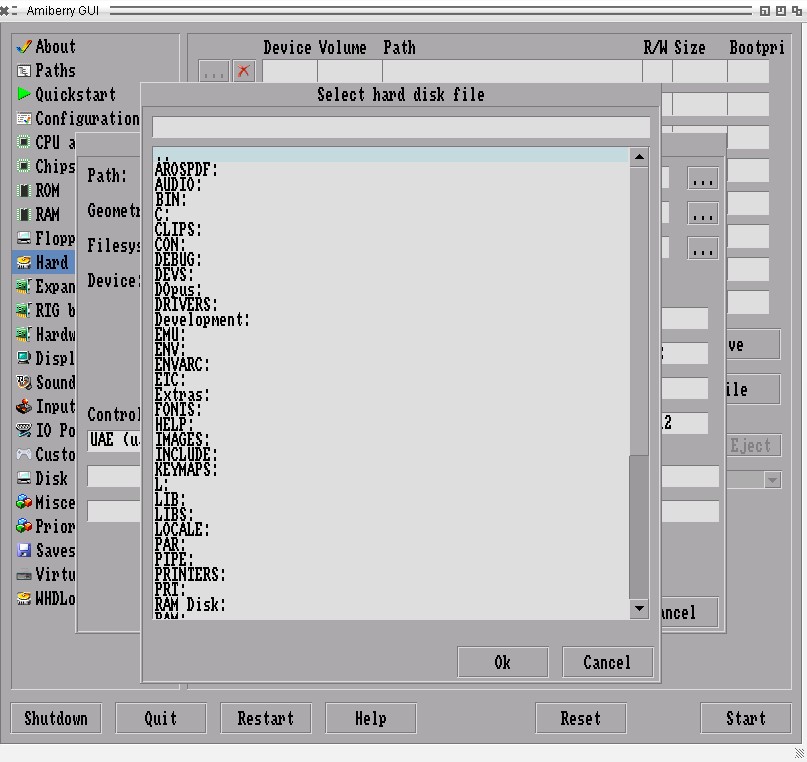
It is now possible to browse till drives list where before you couldn't
It is now possible to use "shifted" special symbols (eg. :, ! etc.) aside from base characters in path textboxes
Rescan Paths and Rescan ROMs now should works as expected (no crashes anymore), Rescan ROMs is, again, executed by default
Savestates now works

New option / Tooltype:
In case of problems with rescan starting amiberry (eg. crashes), rescan roms can be skipped with:

NO_RESCAN_ROMS, can also be disabled with --no-rescan-roms

New feature:
Amiberry can be called from anywhere using command line or scripts!
eg.
Extras:Emu/amiberry/amiberry Games:WHDLoad/M/mylha.lha


One thing I missed in this release:

Option default_sound_buffer in conf/amiberry.conf is too high by default (65536 or level 10 in GUI) it is safe to change it to 16384 (or level 8 in GUI) otherwise you will have sound lag

Enjoy!
aha, Argo, retrofaza, Amiwell79, ntromans, amigamia
N
ntromansVeteran Member
Posted 12 days ago

Deremon wrote:

@Deremon - @ntromans
Ok I did not make it in time, I will release tomorrow, but one of the two problems is solved, now you can go back to drives, the colon ":" problem is a bit more difficult than I thought initially, can be nested in multiple places (one is SDL2 itself), may the "go back to root" be enough for now?


No rush at all, I just thought I'd mention these while I had a minute. Many thanks for producing this, it really is vital software for 64 bit.

Cheers,
Nigel.
D
DeremonMember
Posted 12 days ago
@ntromans
Ok I did not make it in time, I will release tomorrow, but one of the two problems is solved, now you can go back to drives, the colon ":" problem is a bit more difficult than I thought initially, can be nested in multiple places (one is SDL2 itself), may the "go back to root" be enough for now?
Deremon attached the following image:
amiberry.jpg
D
DeremonMember
Posted 12 days ago
Hi!
I have to push a new optimized version today if I can made it in time, I’ll try to fix these two problems in this new release
Edited by Deremon on 13-08-2026 13:43, 12 days ago
OlafSch, ntromans, amigamia
N
ntromansVeteran Member
Posted 12 days ago
Many thanks for the update - i've just downloaded the new version for testing.

Not very far into it but I've fpund that unfrotunately you still can't select any folders that are not in the same partition as amiberry; for 'example, if amiberry is in work:amiberry/ you can't select a folder in documents: to load into the emulation. Also I can't get ':' (or indeed any shifted character that is not a letter) in the path requester.

Cheers,
Nigel.
Edited by ntromans on 13-08-2026 13:10, 12 days ago
AMIGASYSTEMAMIGASYSTEMDistro Maintainer
Posted 16 days ago
I've noticed an issue with saving and opening config files. I'm not sure if it's specific to my system, but sometimes the saved files don't match. Also, if you try to load different configs, in many cases the saved Kickstarts aren't displayed. Then, if you open another config later, you'll often see that the Kickstart you saved is also present in that config.

There are still issues with WHDLoad games—I’m not sure if it’s my system—but I get an error saying “WHDLoad is not executable,” and the Temp folder that’s created is incomplete, Basically, boot-data.zip is partially extracted.

--- Italiano ---

Ho notato un problema nel salvare e aprire i file config, non so se dipende dal mio sistema, ma alcune volte i salvataggi non corrispondono, inoltre se provi a caricare i vari Config in molti casi i Kickstart salvati non vengono mostrati, poi se successivamente apri un'altro config è facile vedere che il kickstart che avevi salvato è presente anche in qesto config.

Ci sono ancora problemi con i giochi WHDLoad non so se è nel mio sistema, mi viene mostrato l'errore WHDload non eseguibile, la cartella Temp creata è incompleta, praticamente boot-data.zip viene scompattato parzialmente.
D
DeremonMember
Posted 19 days ago
This version of amiberry is tested enough to be published on archives (with brand new fixed AROS roms from 06/08/2026 nightly included).

Latest changes:

Fixes:
Resetting a running emulation no longer crashes Amiberry

Extra configurations:
Enable SDL_RENDERER_ACCELERATED via OpenGL for a smooth full-window experience:

enable HW_ACCEL tooltype, it can also be enabled with --hw-accel flag, you need ENVARC:SDL2/GL_Renderer with value of 1

What was done and what to expect next:

I spent months (4-5) trying to bring bsdsocket alive, no approaches worked and at the moment I postponed that goal after reaching a target new major.
With this version on archives amiberry will slowly (the spare time when not doing other ports) forward to 7.1.1(+?), I'm cherry picking commits to reach that goal.
Other features like Drawbridge, host run etc. will stay disabled until I can really dedicate my "full" spare time (if I go out of other ports to do) or if someone wants to join and contribute (in this case let me know Smile ).
With the latest great work from Deadwood with Nvidia drivers enabling SDL_RENDER_ACCELERATED was possible let me know how it perform.

Stay Tuned
ami-elvis, deadwood, aha, retrofaza, Amiwell79, pixie, sonountaleban
AMIGASYSTEMAMIGASYSTEMDistro Maintainer
Posted 7 months ago
With the touchpad, you can simulate the middle mouse button using two or three fingers. Search Google in your language for details.

The simplest solution is to use a USB/wireless mouse, which is much more convenient than the touchpad.
N
ntromansVeteran Member
Posted 7 months ago

AMIGASYSTEM wrote:

@AMIGASYSTEM - Yes, the menus on Amiga Emulato are slow or malfunction, but even with Amiga Workbench, if you press the middle mouse button, the menu works fine.

Even if you activate FullScreen, the menu on Amiga Workbench works fine!

1024 RAM: your system probably does not have enough RAM. If you are using a virtual machine, make sure you set at least 6GB of RAM.


It's a on laptop so no middle mouse button and it has 8 GB ram installed...

Cheers,
Nigel.
AMIGASYSTEMAMIGASYSTEMDistro Maintainer
Posted 7 months ago
Yes, the menus on Amiga Emulato are slow or malfunction, but even with Amiga Workbench, if you press the middle mouse button, the menu works fine.

Even if you activate FullScreen, the menu on Amiga Workbench works fine!

1024 RAM: your system probably does not have enough RAM. If you are using a virtual machine, make sure you set at least 6GB of RAM.
N
ntromansVeteran Member
Posted 7 months ago

AMIGASYSTEM wrote:

@AMIGASYSTEM - For the RAM you can set NATMEM_SIZE=1024 or NATMEM_SIZE=768 on tooltype and assign a lot of Z3 RAM (amiberry will calculate the maximum possible Z3)

JIT works but motherboard memory and processor slot memory cannot be more than 4MB.

For the right button, if you want to get the mouse pointer back on Wanderer, you must press the middle button on the mouse. Once you have done this, the mouse pointer will appear and the Wanderer menus will function normally.


NATMEM_SIZE=1024 is what's been failing giving the 'Could not initialise 32 bit address space' error, however many thanks for the tip to use on using 768; that *does* work and now I have 256MB Z3 ram in the emulation. That is incredibly helpful as some of my larger documents in PageStream will not fit into 128MB.

Sorry for being unclear about the right mouse button problem; the issue is not in Wanderer but in the emulation, unless I do the 'pull up GUI and then resume' trick I can't get any menus in the emulated Amiga, be that for Workbench, PageStream, Finalcalc or any other program. As mentioned, this may be due to running on a public screen to avoid the 'disappearing Amiberry fullscreen' problem.

As mentioned, I am absolutely not trying to decry the effort that has been made to get Amiberry working, I fully appreciate it will have been a massive effort to get this stage and overall it works fantastically well for a first release.

Cheers,
Nigel.
AMIGASYSTEMAMIGASYSTEMDistro Maintainer
Posted 7 months ago
For the RAM you can set NATMEM_SIZE=1024 or NATMEM_SIZE=768 on tooltype and assign a lot of Z3 RAM (amiberry will calculate the maximum possible Z3)

JIT works but motherboard memory and processor slot memory cannot be more than 4MB.

For the right button, if you want to get the mouse pointer back on Wanderer, you must press the middle button on the mouse. Once you have done this, the mouse pointer will appear and the Wanderer menus will function normally.
N
ntromansVeteran Member
Posted 7 months ago

AMIGASYSTEM wrote:

@AMIGASYSTEM - In previous posts, we have already discussed how to increase RAM, or how to call up the Amiberry GUI!


Calling up GUI is as noted above, F9, no issues there. The issue is right mouse button.

Trying to set extra ram as previously noted in this thread does *not* work on my i5, as reported above.

Cheers,
Nigel.
You can view all discussion threads in this forum.
You cannot start a new discussion thread in this forum.
You cannot reply in this discussion thread.
You cannot start on a poll in this forum.
You cannot upload attachments in this forum.
You can download attachments in this forum.
Moderator: Administrator
Users who participated in discussion: deadwood, AMIGASYSTEM, pixie, ntromans, retrofaza, Amiwell79, Farox, Deremon, Bohun